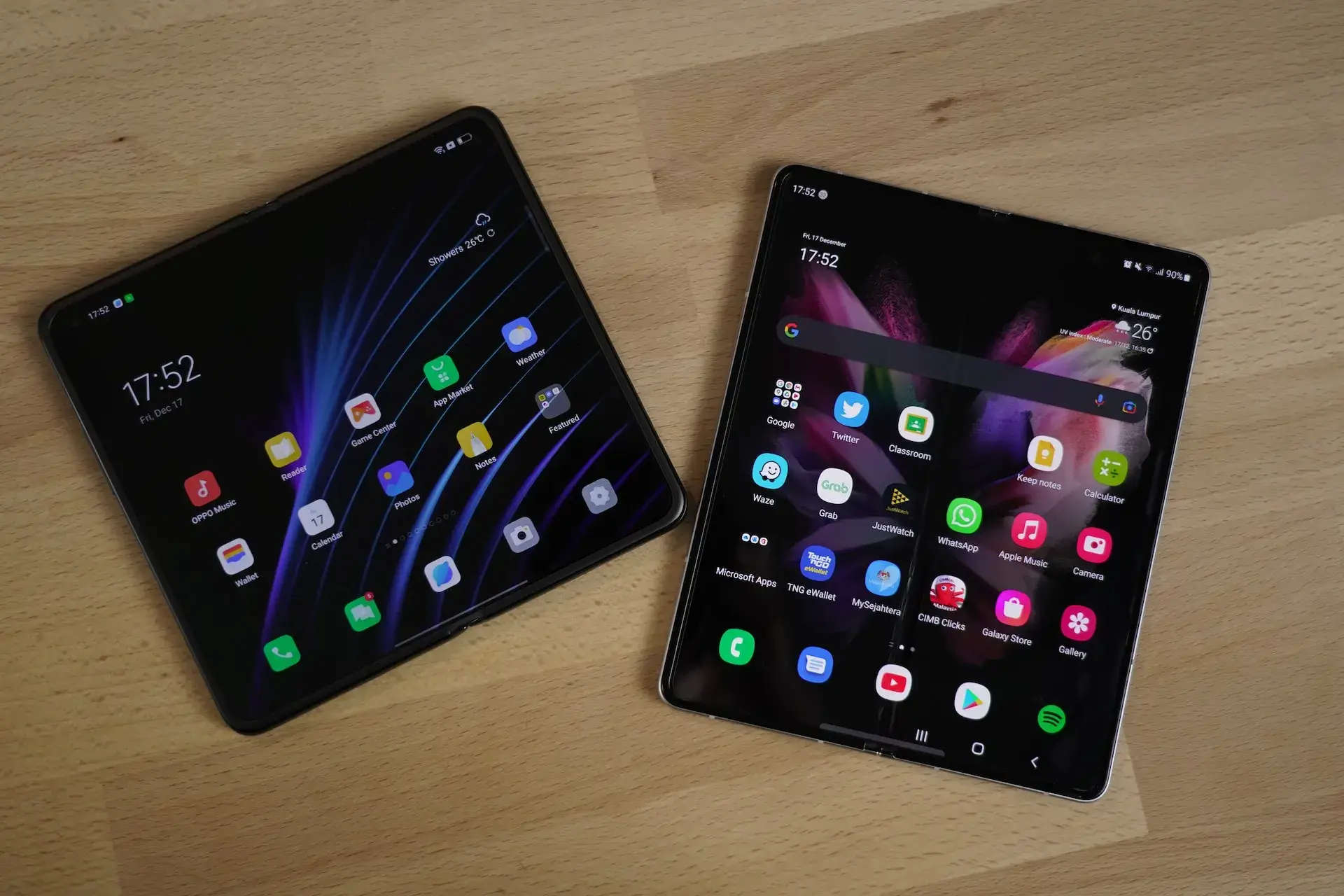
In Understanding Foldables I walked through the kinds of foldable devices, their fold states, and the postures — tabletop, book, tent — that they unlock. I closed that post with a promise: in a follow-up we would actually develop the UI for those states. This is that follow-up.
Rather than show disconnected snippets, I built a small but complete sample app — an adaptive "now playing" media player — and ran it on the Pixel Fold emulator in every posture. Everything below is taken from that project (full source on GitHub), package name in.singhangad.foldableexample. The end result reacts to four situations from a single code path:
- Folded (outer display) → one scrolling column.
- Unfolded flat (inner display) → player and playlist side by side.
- Tabletop (half-open, horizontal hinge) → player above the fold, playlist below.
- Book (half-open, vertical hinge) → two pages split at the hinge.
Two signals, not one
The mistake I see most often is treating "foldable" as a single boolean. It isn't. A fold-aware layout is driven by two independent signals, and you need both:
- Posture — how the device is physically folded right now. This comes from Jetpack WindowManager's
FoldingFeature. It is what tells you the hinge is half-open and running horizontally (tabletop) versus vertically (book). - Window size class — how much space your window actually has. A folded outer display is compact; an unfolded inner display is medium or expanded. This is what decides single-pane vs. two-pane when the device is flat.
Posture takes priority when the device is genuinely half-open — the hinge is a natural seam to lay content against. Otherwise, size decides. Keep these two concerns separate and the rest falls out cleanly.
Dependencies
Two libraries do the heavy lifting. androidx.window exposes the fold/hinge information; material3.adaptive gives us the window size class.
# gradle/libs.versions.toml
[versions]
androidxWindow = "1.3.0"
androidxComposeAdaptive = "1.1.0"

[libraries]
androidx-window = { module = "androidx.window:window", version.ref = "androidxWindow" }
androidx-compose-material3-adaptive = { module = "androidx.compose.material3.adaptive:adaptive", version.ref = "androidxComposeAdaptive" }
// app/build.gradle.kts
dependencies {
    // Foldables / adaptive layouts
    implementation(libs.androidx.window)
    implementation(libs.androidx.compose.material3.adaptive)
    // ...compose, lifecycle, etc.
}
A small Kotlin gotcha before we go further: my package is
in.singhangad.foldableexample, andinis a hard keyword in Kotlin. TheapplicationIdandnamespacestrings are fine, but everypackageandimportstatement has to escape it with backticks —package \in`.singhangad.foldableexample. The directory on disk stays plainin/`.
Detecting posture with WindowManager
WindowInfoTracker exposes a Flow<WindowLayoutInfo>. Each emission carries a list of DisplayFeatures; the one we care about is FoldingFeature, which reports state (FLAT / HALF_OPENED), orientation (HORIZONTAL / VERTICAL), bounds (the hinge rectangle in window pixels), isSeparating, and occlusionType.
I don't want raw FoldingFeature leaking into my composables, so I reduce it to a small sealed type that names the three cases an app actually lays out for:
sealed interface DevicePosture {
    /** Flat, closed, or no hinge. Lay out by window size, not by fold. */
    data object Normal : DevicePosture

    /** Half-opened with a horizontal hinge — the device rests on a surface. */
    data class TableTop(val hinge: Hinge) : DevicePosture

    /** Half-opened with a vertical hinge — the device is held open like a book. */
    data class Book(val hinge: Hinge) : DevicePosture
}

/** The hinge, in the activity window's pixel coordinate space. */
data class Hinge(
    val bounds: Rect,
    val isSeparating: Boolean,
    val occludes: Boolean,
)
The collection itself is a @Composable that reads WindowInfoTracker and exposes the posture as state. The important detail is collectAsStateWithLifecycle: it starts collecting when the activity is STARTED and stops at STOPPED, so we never hold a window callback open in the background.
@Composable
fun rememberDevicePosture(): DevicePosture {
    val activity = LocalActivity.current ?: return DevicePosture.Normal

    val layoutInfo by remember(activity) {
        WindowInfoTracker.getOrCreate(activity).windowLayoutInfo(activity)
    }.collectAsStateWithLifecycle(initialValue = null)

    return remember(layoutInfo) {
        val fold = layoutInfo?.displayFeatures
            ?.filterIsInstance<FoldingFeature>()
            ?.firstOrNull()
            ?: return@remember DevicePosture.Normal

        val hinge = Hinge(
            bounds = fold.bounds,
            isSeparating = fold.isSeparating,
            occludes = fold.occlusionType == FoldingFeature.OcclusionType.FULL,
        )

        when {
            fold.isTableTop() -> DevicePosture.TableTop(hinge)
            fold.isBook() -> DevicePosture.Book(hinge)
            else -> DevicePosture.Normal
        }
    }
}
The posture classification is just the state/orientation pair — straight out of the official guidance:
/** Tabletop: half-opened with the hinge running horizontally across the screen. */
private fun FoldingFeature.isTableTop(): Boolean =
    state == FoldingFeature.State.HALF_OPENED &&
        orientation == FoldingFeature.Orientation.HORIZONTAL

/** Book: half-opened with the hinge running vertically down the screen. */
private fun FoldingFeature.isBook(): Boolean =
    state == FoldingFeature.State.HALF_OPENED &&
        orientation == FoldingFeature.Orientation.VERTICAL
A couple of properties are easy to skip but worth respecting. isSeparating is true whenever the fold splits the window into two logical areas (always true when half-open, and also true on dual-screen devices spanning a hinge). occlusionType == FULL means the hinge physically hides pixels — on those devices you must not draw anything inside bounds. On a continuous flexible display, content may bleed across the fold safely.
Picking a layout by size
When the device is flat or closed, posture is Normal and the amount of width decides the layout. currentWindowAdaptiveInfo() gives the window size class, and the breakpoint constants make the intent readable:
val widthExpanded = currentWindowAdaptiveInfo().windowSizeClass
    .isWidthAtLeastBreakpoint(WindowSizeClass.WIDTH_DP_MEDIUM_LOWER_BOUND)
WIDTH_DP_MEDIUM_LOWER_BOUND is 600dp. Below that you are on a phone or a folded outer display; at or above it you are on an unfolded inner display, a tablet, or a resizable desktop window. Note the deliberate phrasing — this is not isTablet(). The same Fold gives you a compact width folded and an expanded width unfolded, and split-screen multitasking can hand you a medium width on a device that is physically large. Size classes are about the window, not the hardware.
Wiring it together
The top-level screen is the whole decision tree, and it is small:
@Composable
fun MediaPlayerScreen(posture: DevicePosture) {
    val widthExpanded = currentWindowAdaptiveInfo().windowSizeClass
        .isWidthAtLeastBreakpoint(WindowSizeClass.WIDTH_DP_MEDIUM_LOWER_BOUND)

    when (posture) {
        is DevicePosture.TableTop -> TableTopLayout(posture.hinge)
        is DevicePosture.Book -> BookLayout(posture.hinge)
        DevicePosture.Normal -> if (widthExpanded) TwoPaneLayout() else SinglePaneLayout()
    }
}
Compact and expanded
The two size-driven layouts are ordinary Compose. Compact stacks everything; expanded puts the player and a fixed-width playlist side by side.
@Composable
private fun SinglePaneLayout() {
    Column(modifier = Modifier.fillMaxSize().safeDrawingPadding()) {
        NowPlayingHero(label = "PHONE", track = sampleTracks.first(), modifier = Modifier.padding(16.dp))
        Playlist(tracks = sampleTracks.drop(1), contentPadding = PaddingValues(horizontal = 16.dp))
    }
}

@Composable
private fun TwoPaneLayout() {
    Row(modifier = Modifier.fillMaxSize().safeDrawingPadding()) {
        Box(modifier = Modifier.weight(1f).padding(16.dp)) {
            NowPlayingHero(label = "UNFOLDED · TWO PANE", track = sampleTracks.first())
        }
        Playlist(tracks = sampleTracks.drop(1), modifier = Modifier.width(340.dp).fillMaxHeight())
    }
}
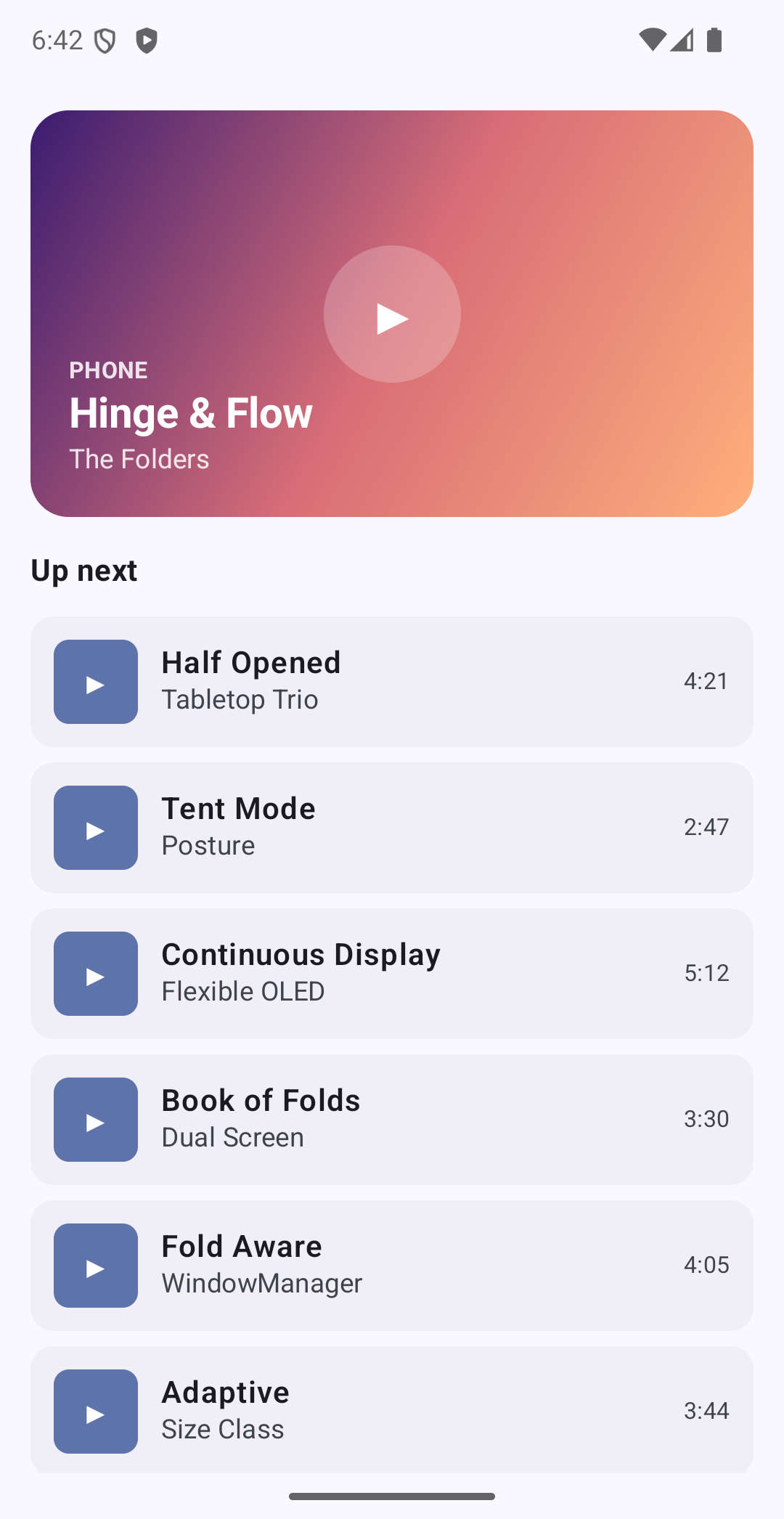
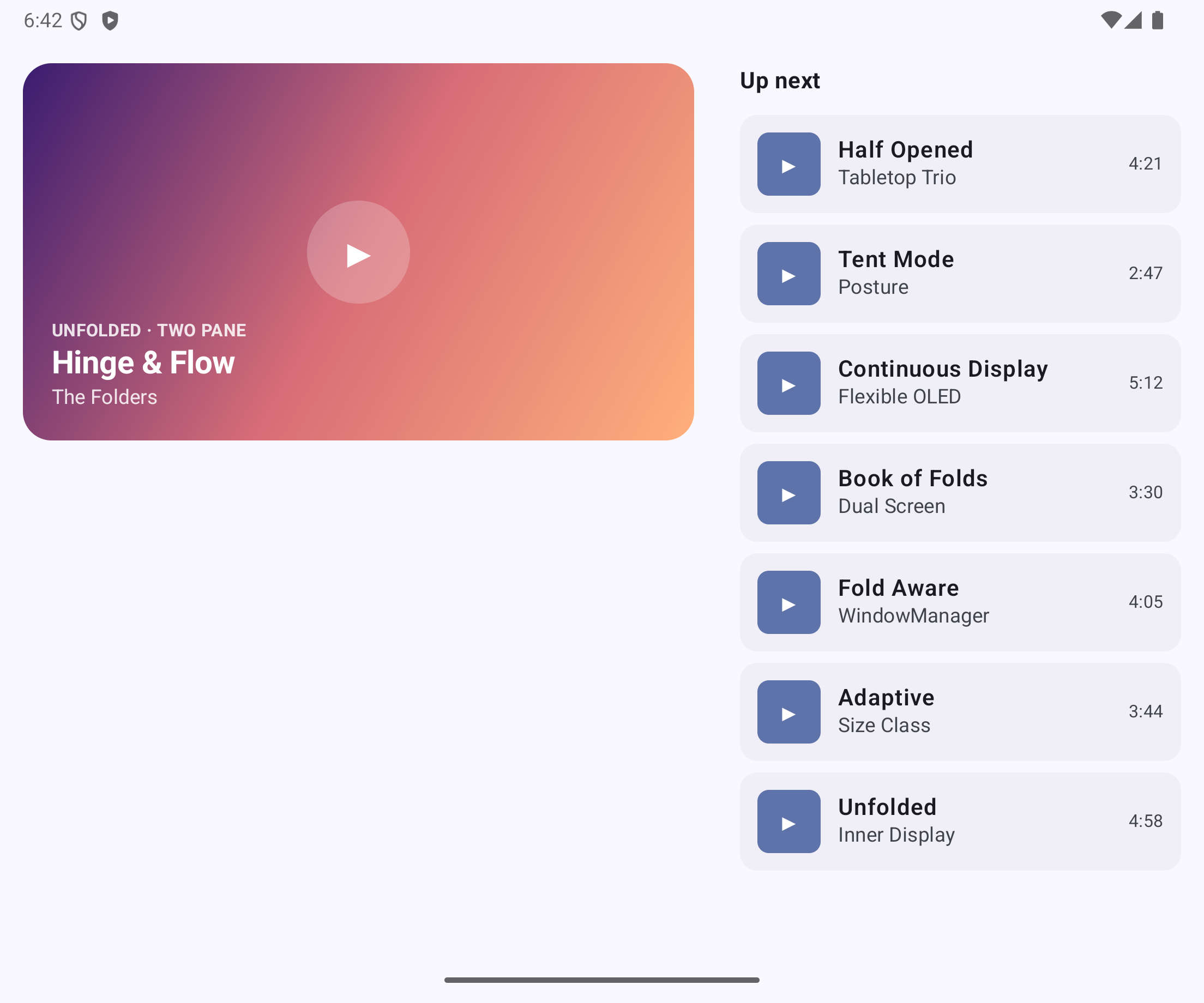
Left: folded outer display (compact width → single pane). Right: unfolded inner display (expanded width → two panes).
Tabletop — split on the hinge
This is where the hinge bounds earn their keep. In tabletop posture the hinge is horizontal, so I size the top pane to the space above the fold, leave the hinge region empty, and let the playlist take everything below. Sizing from the actual bounds means the split lands exactly on the physical crease instead of an arbitrary 50%.
@Composable
private fun TableTopLayout(hinge: Hinge) {
    val density = LocalDensity.current
    val topHeight = with(density) { hinge.bounds.top.toDp() }
    val hingeThickness = with(density) { (hinge.bounds.bottom - hinge.bounds.top).toDp() }

    Column(modifier = Modifier.fillMaxSize()) {
        NowPlaying(
            label = "TABLETOP · above the fold",
            track = sampleTracks.first(),
            modifier = Modifier
                .fillMaxWidth()
                .height(topHeight)
                .padding(WindowInsets.statusBars.asPaddingValues())
                .padding(16.dp),
        )
        // Leave the hinge region empty so no content is lost in the fold.
        Spacer(modifier = Modifier.fillMaxWidth().height(hingeThickness))
        Playlist(
            tracks = sampleTracks.drop(1),
            modifier = Modifier.weight(1f).padding(WindowInsets.navigationBars.asPaddingValues()),
        )
    }
}
Book — split into pages
Book posture is the same idea rotated 90°: the hinge is vertical, so the player takes the left page (sized to bounds.left) and the playlist takes the right.
@Composable
private fun BookLayout(hinge: Hinge) {
    val density = LocalDensity.current
    val leftWidth = with(density) { hinge.bounds.left.toDp() }
    val hingeThickness = with(density) { (hinge.bounds.right - hinge.bounds.left).toDp() }

    // Split in full-window space so the seam lands on the hinge; both pages span
    // the full height, so each applies the vertical system-bar insets itself.
    Row(modifier = Modifier.fillMaxSize()) {
        Box(
            modifier = Modifier
                .width(leftWidth)
                .fillMaxHeight()
                .padding(WindowInsets.statusBars.asPaddingValues())
                .padding(WindowInsets.navigationBars.asPaddingValues())
                .padding(16.dp),
        ) {
            NowPlayingHero(label = "BOOK · left page", track = sampleTracks.first())
        }
        Spacer(modifier = Modifier.width(hingeThickness).fillMaxHeight())
        Playlist(
            tracks = sampleTracks.drop(1),
            modifier = Modifier
                .weight(1f)
                .padding(WindowInsets.statusBars.asPaddingValues())
                .padding(WindowInsets.navigationBars.asPaddingValues()),
        )
    }
}
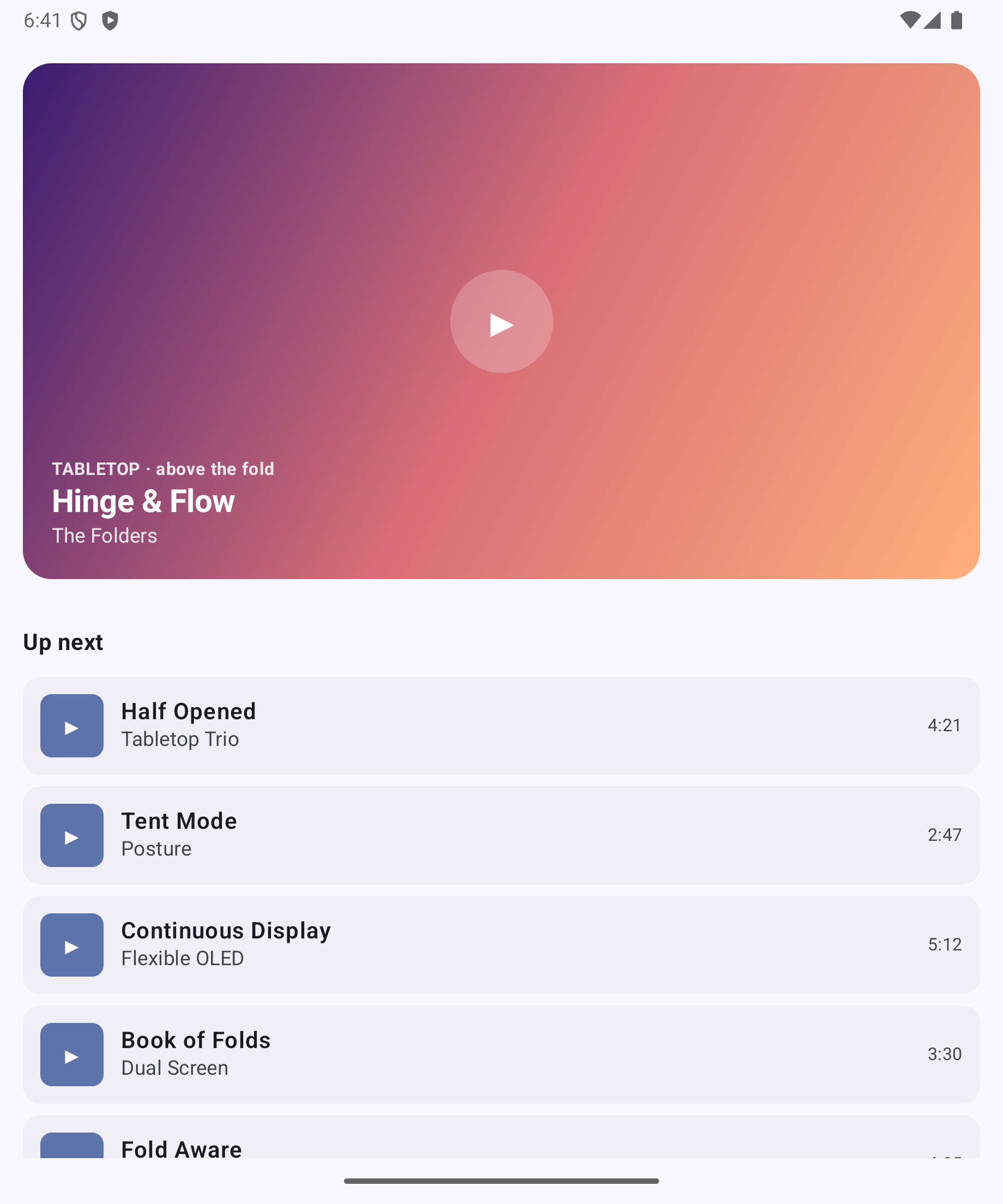
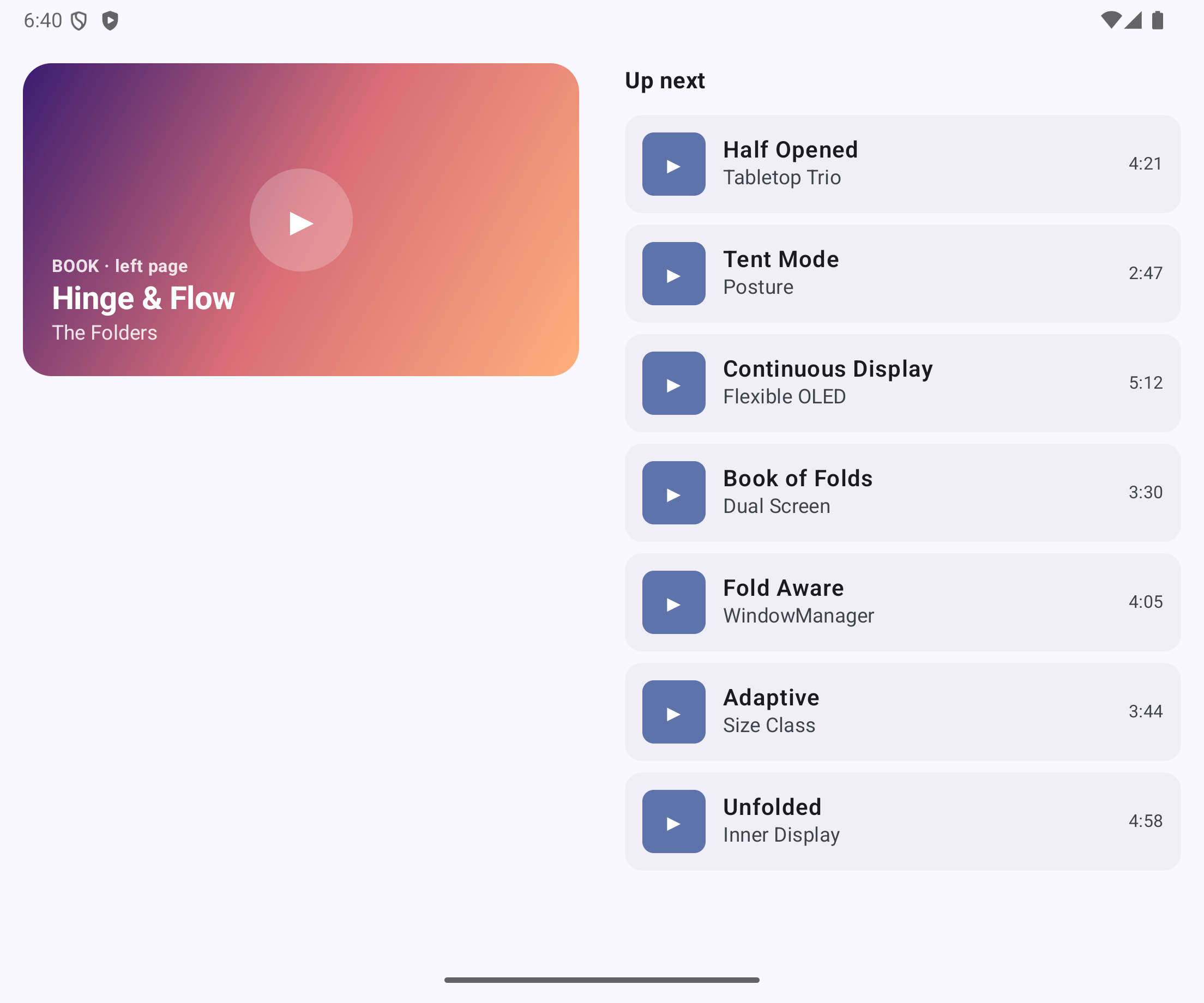
Left: tabletop posture — player above the fold, list below. Right: book posture — player and list split at the vertical hinge.
Don't get recreated on every fold
By default, folding or unfolding is a configuration change and Android recreates your activity, throwing away scroll position and playback state in the middle of a posture transition. Declare that you handle those changes yourself so WindowManager updates flow through without a restart:
<activity
    android:name=".MainActivity"
    android:configChanges="screenLayout|screenSize|smallestScreenSize|orientation|keyboardHidden"
    android:exported="true">
Compose re-reads the new WindowLayoutInfo and currentWindowAdaptiveInfo() automatically — there is nothing else to wire up.
Testing without a foldable in your hand
You don't need the hardware. The Pixel Fold AVD ships with the postures built in, and you can drive them entirely from the command line — which also makes them scriptable in CI. The device states map straight onto our FoldingFeature cases:
adb shell cmd device_state print-states
#  0=CLOSED  1=HALF_OPENED  2=OPENED  3=REAR_DISPLAY_MODE

adb shell cmd device_state state 2   # OPENED  → flat inner display (two-pane)
adb shell cmd device_state state 0   # CLOSED  → outer display (single pane)
adb shell cmd device_state state 1   # HALF_OPENED → book posture (portrait)
The hinge orientation follows the device orientation. The Fold's hinge is vertical in portrait, so HALF_OPENED there is book posture. Rotate to landscape first and the same half-open state becomes tabletop:
adb shell settings put system accelerometer_rotation 0
adb shell settings put system user_rotation 1   # landscape
adb shell cmd device_state state 1               # HALF_OPENED → tabletop
Every screenshot in this post was captured exactly this way. One thing the emulator taught me: posture changes that don't resize the window (going OPENED → HALF_OPENED on the same inner display) don't always push a fresh WindowLayoutInfo to an app that's already foregrounded — relaunching the activity in the target state shows the correct layout reliably. Transitions that do resize the window (folding to the outer display and back) update live, no relaunch needed.
A few things worth knowing
- Coordinate space.
FoldingFeature.boundsis in window pixels, measured from the top-left of the window including the system bars. If you applysafeDrawingPadding()to the root before splitting, your panes shift by the status-bar height and the seam drifts off the hinge. Split in full-window space, then apply insets inside each pane (as the tabletop and book layouts do). - The hinge angle is not exposed.
FoldingFeaturedeliberately doesn't give you the raw degrees — sensor accuracy and reporting ranges vary across devices. Design for the discrete states (FLAT,HALF_OPENED), not a continuous angle. - Synchronous posture support (Android 15+). With WindowManager Extensions v6 you can ask
WindowInfoTracker.supportedPostureswhether a device supports tabletop at all, regardless of current state — handy for deciding up front whether a fold-aware layout is even worth offering. - Don't crowd the seam. When
isSeparatingis true, keep interactive controls away from the fold; they're awkward to reach and may sit under an occluding hinge.
Wrapping up
The whole thing is two ideas kept apart: posture from WindowInfoTracker for the explicit half-open layouts, and window size class from currentWindowAdaptiveInfo() for everything else. Reduce the raw FoldingFeature to a small domain type, collect it lifecycle-aware, size your panes from the real hinge bounds, and tell the system you'll handle the configuration change. A single MediaPlayerScreen then serves a folded phone, an unfolded tablet-class display, and both half-open postures — without a device-model check anywhere in sight.
Links and References
- Foldable-Example on GitHub — the complete sample app from this post
- Understanding Foldables — Part 1 of this series
- Make your app fold-aware — Jetpack WindowManager guide
- Use window size classes
- Jetpack WindowManager release notes
- platform-samples: WindowManager