
For years the contract between an app and the system has been the Intent: "open this screen", "share this text", "view this URL". Intents move the user to a place in your app. They don't let something else do the thing on the user's behalf.
AppFunctions is Android's answer to a different question: how does an on-device AI agent — Gemini, an assistant, another authorized app — discover what your app can do and then actually do it, without screen-scraping your UI? If you've followed the Model Context Protocol (MCP), the mental model is the same — apps expose "tools", agents orchestrate them — except here the tools run on the device, in your app's own process. No server to host, no network round-trip, direct access to your existing app state.
It's experimental and Android 16+ only, with Gemini integration still in private preview as of mid-2026. But you can build and test against it today, so I did. Rather than paste disconnected snippets, I scaffolded a complete app — a tiny notes app, package in.singhangad.notefunctions — exposed its capabilities as functions, and watched the build system turn them into something an agent can see. Everything below is from that project, and it compiles. The full source is on GitHub: singhangadin/NoteFunctions.
## What we're building
A notes app that does the obvious four things — list, create, edit, delete — through normal Compose UI, and exposes those same four operations as AppFunctions. The payoff: when an agent calls createNote, the note appears live in the on-screen list, because the UI and the functions read the same repository. The agent isn't driving the UI; it's calling into the same core the UI calls.
User: "Add a note titled 'Groceries' with milk, eggs and bread."
  → agent invokes createNote(title="Groceries", content="milk, eggs, bread")
  → the note is now in the app, visible in the list, no taps required
I generated the project skeleton with the android CLI (android create empty-activity), which gives you a current Compose + Navigation 3 template. The rest is the AppFunctions wiring.
## Dependencies and build setup
Three artifacts and the KSP plugin. The library ships an annotation processor that generates the schema the OS indexes — that's the whole reason KSP is in the picture.
[versions]
ksp = "2.3.9"
appfunctions = "1.0.0-alpha09"

[libraries]
androidx-appfunctions          = { module = "androidx.appfunctions:appfunctions", version.ref = "appfunctions" }
androidx-appfunctions-service  = { module = "androidx.appfunctions:appfunctions-service", version.ref = "appfunctions" }
androidx-appfunctions-compiler = { module = "androidx.appfunctions:appfunctions-compiler", version.ref = "appfunctions" }

[plugins]
ksp = { id = "com.google.devtools.ksp", version.ref = "ksp" }
plugins {
    // ...
    alias(libs.plugins.ksp)
}

// Aggregate every @AppFunction in the module into one generated schema.
// In a multi-module app you declare this once, in the app module.
ksp {
    arg("appfunctions:aggregateAppFunctions", "true")
}

dependencies {
    implementation(libs.androidx.appfunctions)
    implementation(libs.androidx.appfunctions.service)
    ksp(libs.androidx.appfunctions.compiler)
}
Build requirements the docs undersell
compileSdk = 37. The guide says 36+, butappfunctions:1.0.0-alpha09pulls API 37 transitively and the build fails until you bump it. The platform package isplatforms/android-37.0.- AGP 9.1.0+ (I used 9.2.1), which in turn wants Gradle 9.4.1. The empty-activity template ships an older pairing, so expect to bump the wrapper too.
minSdkcan stay low (I left it at 33). The library is safe to ship to older devices —AppFunctionManagersimply returnsnullwhere the feature isn't supported. The functions only execute on Android 16+.
Kotlin gotcha
Same one that bites every .in package: in is a hard keyword. The namespace and applicationId strings are fine as plain in.singhangad.notefunctions, but every package and import has to escape it with backticks — package `in`.singhangad.notefunctions. The directory on disk stays plain in/. It even shows up, slightly comically, inside the generated schema IDs further down.
## Implementing the functions
With the project configured, the actual work is three steps: a serializable model, the functions themselves, and a factory so the system can build them.
### Step 1 — a serializable model
Anything that crosses the boundary to the agent — parameters and return types — has to be describable. Mark data classes with @AppFunctionSerializable. The detail that matters: isDescribedByKDoc = true means your KDoc becomes part of the schema the agent reads. You are no longer writing comments for the next developer; you're writing the tool description an LLM will use to decide whether and how to call you.
/** * A single note owned by the user. */@AppFunctionSerializable(isDescribedByKDoc = true)data class Note( /** Stable identifier of the note. Pass this back to edit or delete it. */ val id: Int, /** Short, human-readable title. */ val title: String, /** Body text of the note. */ val content: String,)
Supported types are what you'd hope: primitives, String, List<T>, date/time types, nullable types with defaults, and other @AppFunctionSerializable classes.
### Step 2 — the functions
Each capability is a suspend function annotated with @AppFunction. The hard rules:
- The first parameter is always an
AppFunctionContext— it identifies the caller. - AppFunctions run on the UI thread by default, so anything that could block must
withContext(Dispatchers.IO)(and the function beingsuspendis what makes that possible). - Throw the predefined exceptions (
AppFunctionInvalidArgumentException,AppFunctionElementNotFoundException, …) so the agent learns why a call failed and can recover, rather than getting an opaque crash.
class NoteFunctions(private val noteRepository: NoteRepository) {

    /**
     * Lists every note the user has saved.
     *
     * @param appFunctionContext The context in which the AppFunction is executed.
     * @return All notes, or null when there are none yet.
     */
    @AppFunction(isDescribedByKDoc = true)
    suspend fun listNotes(appFunctionContext: AppFunctionContext): List<Note>? =
        withContext(Dispatchers.IO) { noteRepository.all().ifEmpty { null } }

    /**
     * Creates a new note and returns it.
     *
     * @param appFunctionContext The context in which the AppFunction is executed.
     * @param title The title of the note.
     * @param content The body text of the note.
     */
    @AppFunction(isDescribedByKDoc = true)
    suspend fun createNote(
        appFunctionContext: AppFunctionContext,
        title: String,
        content: String,
    ): Note = withContext(Dispatchers.IO) {
        if (title.isBlank()) {
            throw AppFunctionInvalidArgumentException("A note title must not be blank.")
        }
        noteRepository.create(title, content)
    }

    /**
     * Edits an existing note. Only the non-null fields are changed.
     *
     * @param noteId The id of the note to edit.
     * @param title The new title, or null to keep the current one.
     * @param content The new content, or null to keep the current one.
     */
    @AppFunction(isDescribedByKDoc = true)
    suspend fun editNote(
        appFunctionContext: AppFunctionContext,
        noteId: Int,
        title: String?,
        content: String?,
    ): Note = withContext(Dispatchers.IO) {
        noteRepository.update(noteId, title, content)
            ?: throw AppFunctionElementNotFoundException("No note found with id = $noteId")
    }

    // deleteNote(...) follows the same shape.
}
The repository behind these is a deliberately boring in-memory singleton (object NoteRepository) exposing a StateFlow<List<Note>>. The point of the object is that the Compose ViewModel and the NoteFunctions share one instance in one process — so an agent's createNote is reflected on screen instantly. A real app swaps that for Room or a network source.
### Step 3 — telling the system how to build your function class
NoteFunctions has a constructor dependency (NoteRepository), so the system can't instantiate it blind. You provide a factory by implementing AppFunctionConfiguration.Provider on your Application. If you use Hilt you'd inject the instance instead; this is the manual equivalent, and it's the only "plumbing" the whole feature needs.
class NoteFunctionsApplication : Application(), AppFunctionConfiguration.Provider {
    override val appFunctionConfiguration: AppFunctionConfiguration
        get() = AppFunctionConfiguration.Builder()
            .addEnclosingClassFactory(NoteFunctions::class.java) { NoteFunctions(NoteRepository) }
            .build()
}
(If your function class has no constructor parameters, you can skip this step entirely.)
## What the build actually produces
This is the part that makes AppFunctions click. Run ./gradlew assembleDebug and the KSP task kspDebugKotlin emits, among other things:
assets/app_functions.xml— the schema the OS indexes. From our four annotated functions:
<appfunctions>
    <appfunction>
        <function_id>`in`.singhangad.notefunctions.appfunctions.NoteFunctions#createNote</function_id>
        <enabled_by_default>true</enabled_by_default>
    </appfunction>
    <appfunction>
        <function_id>`in`.singhangad.notefunctions.appfunctions.NoteFunctions#editNote</function_id>
        <enabled_by_default>true</enabled_by_default>
    </appfunction>
    <!-- deleteNote, listNotes ... -->
</appfunctions>
(Yes — the backtick-escaped `in` leaks straight into the function IDs. Harmless, but a fun consequence of an Indian-domain package name meeting a Kotlin keyword.)
NoteFunctionsIds.kt— generated ID constants you reference from code, e.g.NoteFunctionsIds.CREATE_NOTE_ID. You need these for runtime gating (below).- Inventory and invoker classes that the
appfunctions-serviceruntime uses to marshal a call from the agent into yoursuspend fun.
You write four annotated functions; the compiler writes the registry, the schema, and the dispatch glue.
## Discovering and invoking — the caller side
A caller (agent or authorized app) needs the android.permission.EXECUTE_APP_FUNCTIONS permission, then works through AppFunctionManager:
val manager = AppFunctionManager.getInstance(context) // null if unsupported (pre-Android 16)
val enabled = manager?.isAppFunctionEnabled(
    packageName = "in.singhangad.notefunctions",
    functionId = NoteFunctionsIds.CREATE_NOTE_ID,
)
You don't need a full agent to confirm the wiring, though. ADB exposes the same index:
adb shell cmd app_function list-app-functions \
  | grep --after-context 10 in.singhangad.notefunctions
If your functions show up there, the OS has indexed them and any authorized agent can find them. You can even point Gemini in Android Studio at adb shell cmd app_function and have it act as the calling agent against your app.
And you don't need an LLM at all to invoke them: Google's AppFunction Studio test app has a Debug tab that lists every discovered function and runs it with arguments you fill in by hand — no agent, no API key. Here it is calling into this app's createNote and editNote:
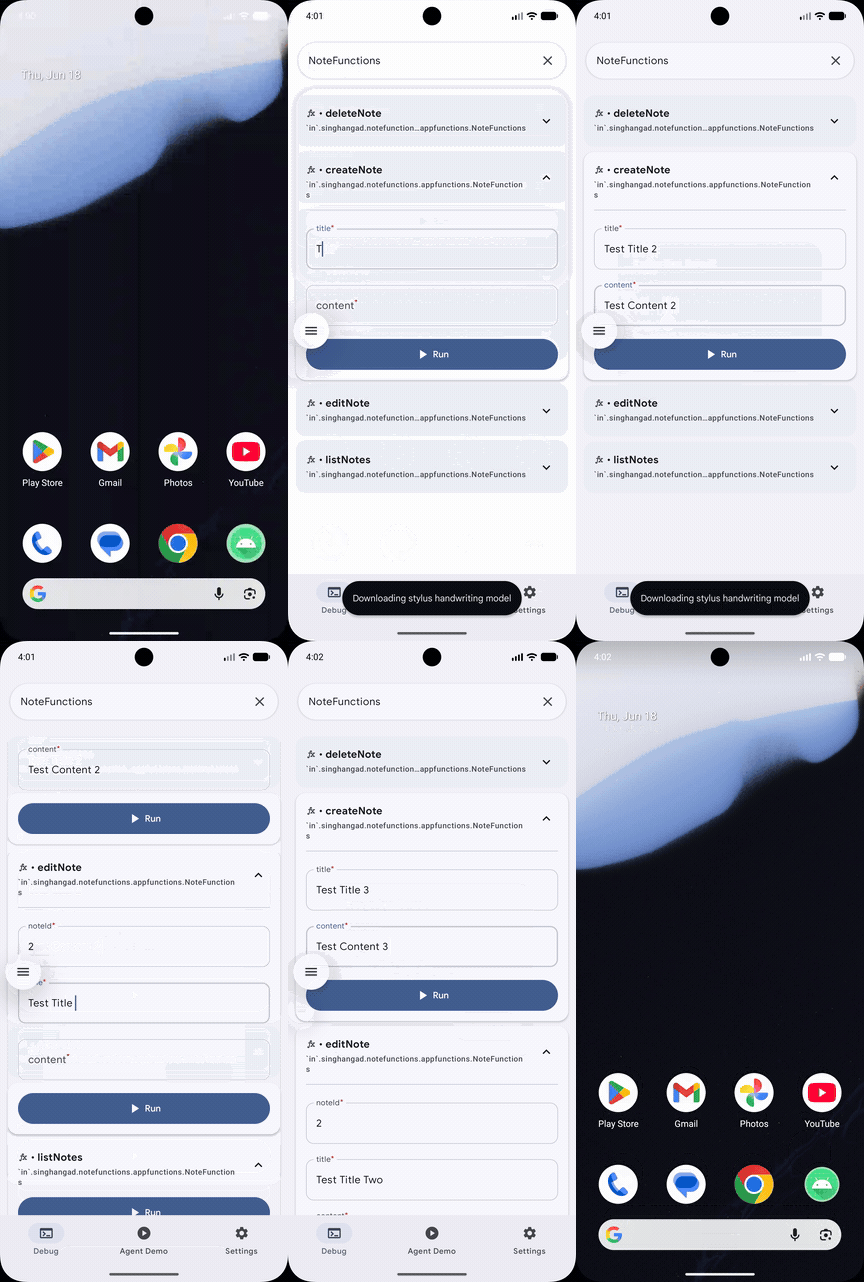
The four functions, discovered by the system and invoked by hand from AppFunction Studio's Debug tab — no Gemini key required. The same call from an agent would just supply those arguments from natural language instead.
## Gating functions at runtime
Some capabilities shouldn't always be available — a premium feature, an account-specific action. Declare the function disabled by default and flip it on once you've verified the precondition:
@AppFunction(isEnabled = false, isDescribedByKDoc = true)
suspend fun createNote(/* ... */) { /* ... */ }
AppFunctionManager.getInstance(context)?.setAppFunctionEnabled(
    NoteFunctionsIds.CREATE_NOTE_ID,
    AppFunctionManager.APP_FUNCTION_STATE_ENABLED,
)
Keeping the index honest about what's actually available is what lets the agent avoid offering the user something that will just fail.
## Security is the design, not a footnote
Important
The official guidance is blunt, and worth internalizing before you expose anything: system agents may process the user's query on a server. That reframes every decision about what to expose.
- Expose what benefits from natural language — things easier to say than to tap through.
- Keep access narrow. A function should reach only the data and actions a specific request needs.
- Don't expose highly personal or confidential data unless the user has clearly consented in the context of the action.
- Guard destructive actions. An agent can call
deleteNote; your app should still own the confirmation step — ideally more than one — in clear, unambiguous language. The agent invoking a function is not the same as the user intending the consequence.
## Where it stands
AppFunctions is experimental: Android 16+, API surface subject to change, and Gemini integration in private preview (an EAP exists if you want in early). But the development loop is real today — annotate, build, adb shell cmd app_function list-app-functions, iterate. There's an official sample app and a Studio agent skill if you want more to read.
What I find genuinely new here isn't the annotations — it's the shift in who your KDoc is for. isDescribedByKDoc = true means a model reads your function descriptions to decide how to use your app. The clearer and more honest those descriptions, the better an agent represents your app to the user. For once, writing good docs has a direct, measurable consumer.