
## The shift
Most "AI in your app" tutorials are really just chat in your app: you send text to a model, you get text back, you render it in a bubble. Useful, but the model is a tourist — it can talk about your app, it can't do anything in it.
An agent is the opposite. You hand the model a set of functions it's allowed to call, and it decides — on its own, mid-conversation — when to call them and with what arguments. The model stops being a chatbot and starts being something closer to a co-pilot wired into your code.
On May 21, 2026, Google shipped ADK for Android 0.1.0 — a Kotlin-first Agent Development Kit that runs this loop inside an Android app, against cloud Gemini or on-device Gemini Nano. It's a month old. So I built something small and real with it, and wrote down everything the quickstart skips.
The result is a small Compose app — ADK Assistant — with one agent, two tools, and (by the end) ChatGPT-style persistent chat history. You ask "what time is it in Tokyo?" and the model calls a real function on your device to find out. The full project is on GitHub: singhangadin/AdkAssistant.
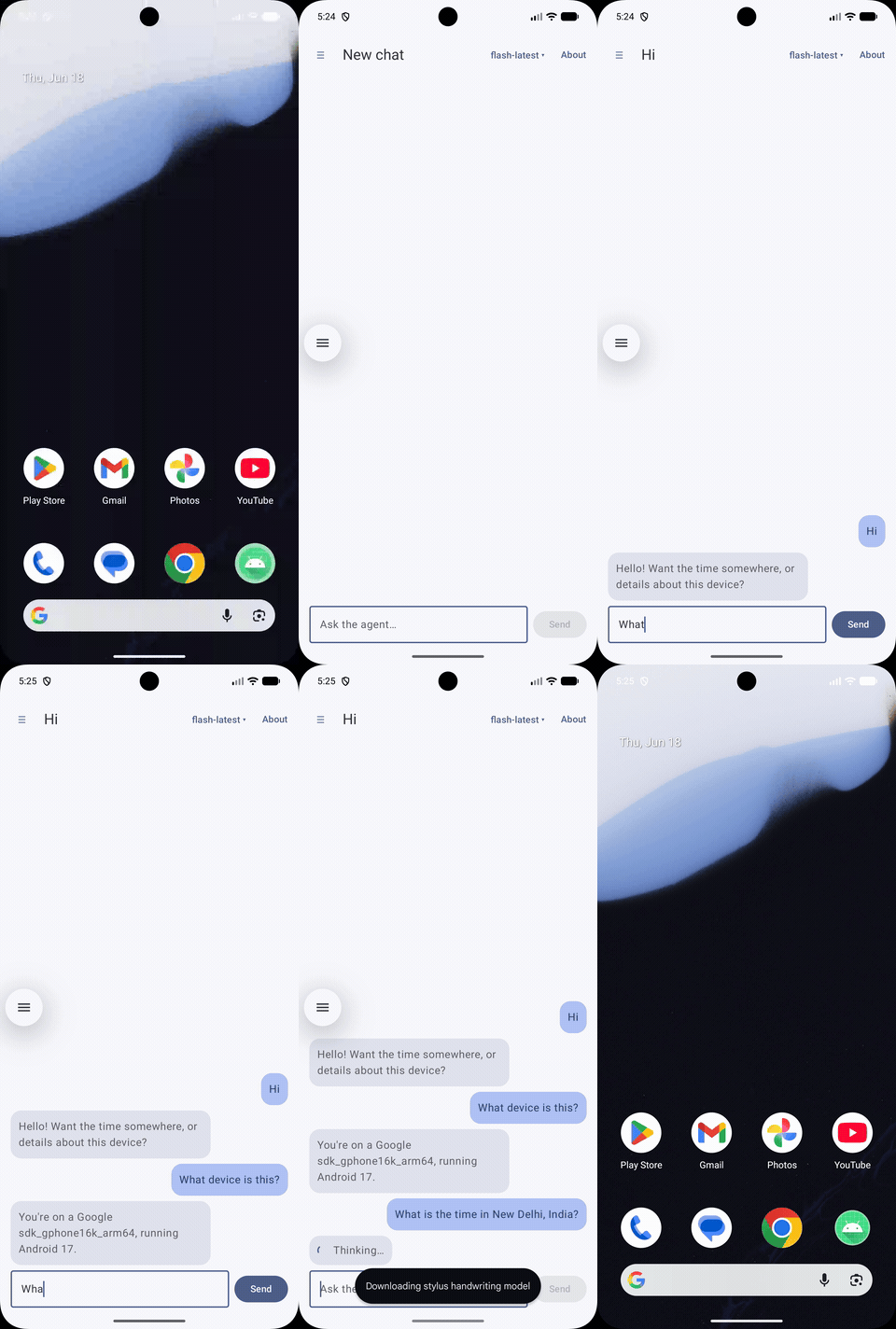

## The core idea, in three pieces
ADK's mental model is refreshingly small. There are three moving parts. (How I wired them into a real app — clean layers, MVI, Hilt — comes right after; the agent surface itself is just these three.)
### 1. Tools — plain Kotlin functions
A tool is just a method with an @Tool annotation. The model never sees your code; it sees the descriptions. So the KDoc and @Param text aren't documentation niceties — they're the prompt.
class DeviceTools {

    /**
     * Returns the current wall-clock time for a given IANA time-zone id.
     *
     * @param timeZoneId an IANA time-zone id such as "Asia/Kolkata".
     *   Empty for the device's own zone.
     */
    @Tool
    fun getCurrentTime(
        @Param("IANA time-zone id, e.g. 'Asia/Kolkata'. Empty for the device zone.")
        timeZoneId: String,
    ): Map<String, String> {
        val zone = if (timeZoneId.isBlank()) TimeZone.getDefault()
                   else TimeZone.getTimeZone(timeZoneId)
        val fmt = SimpleDateFormat("EEE, dd MMM yyyy, HH:mm:ss", Locale.US)
            .apply { timeZone = zone }
        return mapOf("timeZone" to zone.id, "time" to fmt.format(Date()))
    }

    /** Returns basic information about the device the app is running on. */
    @Tool
    fun getDeviceInfo(): Map<String, String> = mapOf(
        "manufacturer" to Build.MANUFACTURER,
        "model" to Build.MODEL,
        "androidVersion" to Build.VERSION.RELEASE,
    )
}
These are ordinary functions. getDeviceInfo() reads Build — something a cloud model could never know about your specific phone. That's the point: the tool is the bridge between the model's reasoning and the device's reality.
### 2. The agent — model + instructions + tools
In the sample, a small factory in the data layer builds the agent, so nothing above it ever imports an ADK type:
class AssistantAgentFactory @Inject constructor() { fun create(): LlmAgent = LlmAgent( name = "device_assistant", description = "Reads the device clock and hardware info.", model = Gemini( name = "gemini-flash-latest", apiKey = BuildConfig.GEMINI_API_KEY, ), instruction = Instruction( "You are a concise on-device assistant. " + "Use 'getCurrentTime' for time questions and 'getDeviceInfo' " + "for device questions. Never invent values a tool can give you." ), // Generated by KSP from the @Tool annotations above. tools = DeviceTools().generatedTools(), )}
The one thing the compiler won't help you with: generatedTools() doesn't exist when you type it. It's generated at build time by KSP from your @Tool annotations, so your IDE shows it red until the first successful build — that threw me for a minute. (The official docs use an object with an @JvmField val rootAgent so ADK's own tooling can discover the agent by reflection. When you construct it yourself and hand it to a runner — like here — you don't need @JvmField.)
### 3. The runner — the conversation loop
The runner drives the actual loop. In the sample it sits behind a repository, so the domain layer sees nothing but suspend fun send(prompt): String:
class AssistantRepositoryImpl @Inject constructor(
    private val runner: InMemoryRunner,
    private val ioDispatcher: CoroutineDispatcher,
) : AssistantRepository {

    override suspend fun send(prompt: String): String = withContext(ioDispatcher) {
        val message = Content(role = Role.USER, parts = listOf(Part(text = prompt)))
        val reply = StringBuilder()
        runner.runAsync(
            userId = "local-user",
            sessionId = "local-session",
            newMessage = message,
        ).collect { event ->
            event.content?.parts?.mapNotNull { it.text }?.forEach { reply.append(it) }
        }
        reply.toString()
    }
}
runAsync returns a Flow of events. The agent loop — call the model → it asks for a tool → run the tool → feed the result back → model answers — happens entirely inside that flow. You never orchestrate the tool calls yourself; you collect the final text. Keep one InMemoryRunner and a stable sessionId and the agent remembers the conversation across turns.
That's the entire agent surface — three small pieces. Everything else is just wiring it up like a real app.
## Wiring it like a real app: clean layers, MVI, Hilt
"Drop it in a ViewModel" is exactly where samples quietly turn into spaghetti, so I built this one the way I'd build an actual feature — Clean Architecture, MVI, Hilt, and the Navigation component:
presentation/  ChatState · ChatIntent · ChatEffect · ChatViewModel · Compose UI · NavHost
   ↓  use case
domain/        ChatMessage · AssistantRepository (interface) · SendMessageUseCase   ← no framework types
   ↑  implements
data/          DeviceTools · AssistantAgentFactory · AssistantRepositoryImpl        ← ADK lives ONLY here
di/            Hilt modules: provide the runner, bind the repository
The payoff is that ADK is quarantined in the data layer. The ViewModel doesn't know Gemini exists — it depends on a SendMessageUseCase, which depends on a domain interface. Swap cloud Gemini for on-device Nano later and nothing above the data layer changes.
The ViewModel is plain MVI: one immutable state in, intents to reduce it, a channel of one-off effects (errors) out.
@HiltViewModel
class ChatViewModel @Inject constructor(
    private val sendMessage: SendMessageUseCase,
) : ViewModel() {

    private val _state = MutableStateFlow(ChatState())
    val state: StateFlow<ChatState> = _state.asStateFlow()

    fun onIntent(intent: ChatIntent) = when (intent) {
        is ChatIntent.InputChanged -> _state.update { it.copy(input = intent.text) }
        ChatIntent.Send -> send()  // append user msg, flip isThinking, call sendMessage(), append reply
    }
}
And Hilt provides the runner once, then binds the repository to its interface:
@Module
@InstallIn(SingletonComponent::class)
object AgentModule {
    @Provides @Singleton
    fun provideRunner(factory: AssistantAgentFactory): InMemoryRunner =
        InMemoryRunner(agent = factory.create(), sessionService = InMemorySessionService())
}
None of this is ADK-specific — that's the point. The agent is just another data source behind a use case.
## What KSP actually generates
The generatedTools() magic is worth opening up, because it explains why the descriptions matter so much. For getCurrentTime, KSP emits a FunctionTool whose declaration() is this:
FunctionDeclaration(
    name = "getCurrentTime",
    description = "Returns the current wall-clock time for a given IANA time-zone id.",
    parameters = Schema(
        type = Type.OBJECT,
        properties = mapOf(
            "timeZoneId" to Schema(
                type = Type.STRING,
                description = "IANA time-zone id, e.g. 'Asia/Kolkata'. Empty for the device zone.",
            ),
        ),
        required = listOf("timeZoneId"),
    ),
)
Look at where the strings came from. The function description is the first line of my KDoc. The parameter description is my @Param text. The required list comes from the fact that timeZoneId is non-nullable. This JSON-schema-shaped object is exactly what gets sent to Gemini as a tool definition.
So when people say "write good KDoc for your tools," it's not a style guideline — those sentences are literally the instructions the model reads to decide whether and how to call your function. Vague KDoc, vague tool calls.
## How sessions and context actually work
Back in the runner snippet I waved at "keep a stable sessionId and the agent remembers." It's worth knowing what's underneath, because it has a sharp edge of its own.
A session in ADK is an ordered event log. Every turn appends events to it — the user message, the model's reply, and any tool calls and tool responses. That list is the memory. It lives behind a SessionService: InMemoryRunner uses InMemorySessionService, which keeps everything in RAM (so it's gone on process death — persist it yourself if you want history to survive). The service is pluggable; there are persistent implementations too.
On each turn the runner doesn't send the model your raw events — it runs a ContentsProcessor that rewrites the event log into the contents list for the request. An includeContents flag on LlmAgent decides how much goes in, and it has exactly two settings:
LlmAgent(/* … */, includeContents = LlmAgent.IncludeContents.DEFAULT) // send history
LlmAgent(/* … */, includeContents = LlmAgent.IncludeContents.NONE)    // stateless: only the current input
No token-window management
ADK 0.1.0 does no token-window management at all. I went looking through the library for truncation, summarization, compaction, token counting — there is none. It hands the model the (filtered) history and relies entirely on Gemini's own context window. A long enough conversation in a single session will eventually overflow it, and ADK won't gracefully trim — that's on you.
The levers it gives you are blunt: includeContents = NONE, reading only the last N events when you load a session, splitting work across multiple sessionIds, or reaching for the separate MemoryService for long-term recall. Good to know before a chat session grows to a few hundred turns.
## Chat history, ChatGPT-style — and why resume needs replay
Once you understand sessions, the obvious next feature builds itself: a drawer of past chats you can reopen, like ChatGPT. I added it to the sample — and it surfaces the one thing the session model quietly leaves to you.
InMemorySessionService is exactly that: in-memory. Kill the process and every session's event log is gone. So the visible transcript needs its own persistence, separate from the agent's memory. I used Room as the single source of truth: a conversations table and a messages table, exposed as Flows the UI observes. The drawer, the message list, auto-titling from the first message — all of it just renders Room.
The agent side is a separate concern, and the trick is one line of policy: sessionId = the conversation id. Each thread gets its own ADK session, so switching chats switches agent memory for free — within a single run.
Across a restart, though, the transcript comes back from Room but the ADK session is empty. So on the first message to a "cold" conversation, I replay its stored history into the session before sending — rebuilding the event log the model reasons over:
// First time we touch a conversation this process: rebuild its session.
val key = SessionKey(runner.appName, userId, conversationId)
val session = sessionService.getSession(key, GetSessionConfig())
    ?: sessionService.createSession(key, emptyMap())

if (session.events.isEmpty()) {
    history.forEach { message ->
        val isUser = message.author == Author.USER
        sessionService.appendEvent(
            session,
            Event(
                author = if (isUser) "user" else "device_assistant",
                content = Content(
                    role = if (isUser) Role.USER else Role.MODEL,
                    parts = listOf(Part(text = message.text)),
                ),
            ),
        )
    }
}
After that, runAsync(userId, conversationId, newMessage) continues the turn with the full history in place, and the model genuinely remembers earlier turns. Two honest notes. First, this leans on the same fact from the last section — there's no token trimming, so replay re-appends every stored event; a very long resumed thread will still eventually hit the window. Second, the clean-architecture split paid off here: none of this touched the ViewModel or the UI. It was a new ConversationRepository (Room) and a few lines inside the existing AssistantRepository — the agent is still just a data source behind a use case.
## The sharp edges (this is the part the docs skip)
The happy-path code above is genuinely small. Getting it to build, package, and behave is where I lost time. All of these are real, all from this project:
1. minSdk is 26, not 24. The official docs say minSdk 24. The actual AAR disagrees:
uses-sdk:minSdkVersion 24 cannot be smaller than version 26
declared in library [com.google.adk:google-adk-kotlin-core-android:0.1.0]
Set minSdk = 26 and move on. (Worth knowing if you've got a minSdk 24 floor for reach.)
2. The cloud deps collide on packaging. Cloud Gemini pulls in google-genai, google-auth, and a pile of gRPC libraries, several of which ship a META-INF/INDEX.LIST. The merge fails:
4 files found with path 'META-INF/INDEX.LIST'
You need a packaging block to drop the duplicates:
packaging {
    resources {
        excludes += "/META-INF/INDEX.LIST"
        excludes += "/META-INF/DEPENDENCIES"
        excludes += "/META-INF/{LICENSE,LICENSE.txt,NOTICE,NOTICE.txt}"
        excludes += "/META-INF/io.netty.versions.properties"
    }
}
3. The cloud path is heavy. That dependency tree isn't free. My trivial two-tool app produced a 19 MB debug APK across 10 dex files — almost all of it the cloud client stack. For a real app you'd lean on R8, and this is a strong argument for the on-device path if your tools don't need a frontier model.
4. Hilt's Gradle plugin fights AGP 9. Adding Hilt for DI, the build blew up immediately:
Failed to apply plugin 'com.google.dagger.hilt.android'.
> Android BaseExtension not found.
AGP 9 removed the old BaseExtension API, and Hilt's plugin up to 2.57.x still references it. The fix is just to use a Hilt new enough to know about AGP 9 — 2.59.2 applied cleanly. If you're on AGP 9, don't reach for the version your muscle memory types.
5. The in in your package name needs backticks. I used in.singhangad.adkassistant (India domain, as you do). in is a Kotlin hard keyword, so every package and import statement has to escape it:
package `in`.singhangad.adkassistant.domain.model
import `in`.singhangad.adkassistant.domain.repository.AssistantRepository
The Gradle namespace/applicationId strings are fine as-is; it's only Kotlin source that needs the backticks. Annoying, harmless, and easy to forget on the next new file.
6. "The agent isn't responding" is usually a 503, not your code. Once it ran, the agent would sometimes just… sit there. I burned time suspecting my key, my model name, my request shape. It was none of them — a direct REST call to the same key and model returned:
503 UNAVAILABLE — "This model is currently experiencing high demand.
Spikes in demand are usually temporary. Please try again later."
It gets weirder. Under load the same endpoint also returns empty 404s — which the SDK surfaces as "this model is no longer available." I nearly went down a "did they deprecate the model?" rabbit hole before checking: the models list endpoint still returned 200, and the body alternated between the 404 and the 503 above. The model wasn't gone; the platform was thrashing. (Swapping models doesn't help here, and not every model id even serves generateContent on the free tier — verify with a real call, not the list.)
So the fix isn't a magic model, it's doing what Google's own guidance says for a 503: retry with exponential backoff — and treating those spurious 404s as transient too, not as "model gone." A few attempts at 1s / 2s / 4s rides out the spike; only then surface an error:
var attempt = 0
while (true) {
    try { return runTurn(prompt) }
    catch (e: Exception) {
        if (!e.isTransient() || attempt >= MAX_RETRIES) throw e
        attempt++
        onStatus(Retrying(attempt, MAX_RETRIES))   // tell the UI
        delay(1_000L shl (attempt - 1))             // 1s, 2s, 4s
    }
}
The sister bug is on the UI side: while all this happens, a single static "…" bubble looks identical to a hung app. There's no built-in notion of agent progress, so you have to model it yourself. I added a tiny AgentStatus (Thinking / Retrying(n, max)) that the repository emits and the chat screen renders as a live spinner with a label — "Thinking…" normally, "Model busy — retrying (2/3)…" during a backoff. Same wait, completely different feel: the user sees the app working instead of frozen.
The versions that actually worked together, for the record: ADK 0.1.0, KSP 2.3.9, Kotlin 2.3.20, AGP 9.0.1, compileSdk 36, Hilt 2.59.2, navigation-compose 2.9.8.
## The key problem nobody should ignore
The fastest way to get this running is the way I showed: read the key from local.properties into BuildConfig.
buildConfigField("String", "GEMINI_API_KEY", "\"$geminiApiKey\"")
Never ship the key in the APK
That is fine for a sample on your own machine. It is not fine for anything you ship — the key sits in plain text inside the APK, and anyone can pull it out. For production, ADK's own guidance is to keep the key off the device entirely: route calls through a backend, or use Firebase AI Logic via the google-adk-kotlin-firebase-android artifact. I kept the sample honest about this with a comment right next to the line, because it's exactly the shortcut that quietly ends up in real apps.
## Cloud today, on-device tomorrow
I built this on cloud Gemini because it runs on any device and any emulator — no special hardware. But the reason ADK on Android is interesting isn't the cloud. It's that the same agent, same tools can run on Gemini Nano, fully on-device, by swapping one line:
// cloud:model = Gemini(name = "gemini-flash-latest", apiKey = BuildConfig.GEMINI_API_KEY)// on-device, via ML Kit GenAI (AICore-capable devices):model = GenaiPrompt.create(generativeModel = /* ML Kit model */, name = "gemini-nano")
Your DeviceTools don't change. The runner doesn't change. The UI doesn't change. That's the part worth sitting with: an agent that reads your clock and your hardware and reasons over them, with no network, no API key, and no data leaving the phone. The tools I picked — time and device info — are toys, but swap them for "draft a reply," "file this expense," "start a workout" and the shape of where Android UX is heading gets obvious.
I'm going to take this further next — on-device Nano on a real Pixel, with tools that actually mutate app state. But even at this size, the lesson landed: an agent is just functions you trust a model to call. ADK's whole job is making that wiring boring. Mostly, it does.
The full sample, build config and all: singhangadin/AdkAssistant.